Submitting results and NEMIX Vision
At the end of a match the scores have to reach the standings, and it is the team that submits them from its own ticket: with the button that appears under the lobby code, where placement, kills and screenshot go out together. With NEMIX Vision the screenshot is enough, and the bot reads the numbers. NEMIX does the points calculation in every case, and only corrections are left to the staff.
How the team submits the result
The result is submitted by the team itself, from its own ticket. The staff does not have to do anything at the end of a match: corrections are what is left to them, when needed.
The button under the lobby code
When the staff sends the lobby code, the 📸 Invia risultato — Game N (Submit result) button appears with it in every team ticket. The captain clicks it and in a single window enters placement and kills and attaches the screenshot right there, not in the chat. After sending, the button turns into ✅ Inviato — Game N (Sent): the team can see at a glance that the result has arrived.
📸 Send result — Game 3
When the match is over, send the Game 3 result here: screenshot and data in one step.
✅ Sent — Game 3
✅ Game 3 Result Registered!
📍 Position
#3
💀 Kills
12
🎯 Game Total
19.2 pts
🏆 Tournament Total
74.6 pts
- With Top Fragger on, the window asks for kills player by player. In teams of 4 the bot first has you pick the placement from a drop-down with the spots still free in the lobby, then asks for kills and screenshot.
- With NEMIX Vision on, only the screenshot is needed: the bot reads placement and kills.
- To correct a result already sent, use Modifica (Edit) under the result, not a second submission.
- If two teams in the same lobby claim the same spot, the result is saved and the staff gets the warning in the commands channel, with both tickets: the wrong one is fixed with Edit.
- If the result arrives within 5 minutes of the next game’s code, it goes to the previous game: a match does not end in 5 minutes. This applies even if the team uses the new game’s button, which stays active for the match in progress.
- The button is born with the lobby code: if the code has not been sent, the team has no button.
Note
A screenshot can be up to 10 MB; if it is larger the bot says so, and the team just sends again with a lighter image. If the team uploads the photo in the chat instead of the window, the bot replies with the button for that game. And if a team really cannot submit, the staff records the result with the commands below or from the dashboard.
Two required screenshots (optional)
From the dashboard, on the tournament page, you can require 2 images per game: the final placement screen and the results screen with the kills. Until both are there, the submit window does not close. There is no Discord command: the switch is only in the dashboard.
Heads up
Turn it on only if you find yourself having to check disputes, otherwise it is one more file per game. And decide before you start: changing it mid-night shows from one game to the next.
What the window asks for depends on NEMIX Vision.
With NEMIX Vision: the photo is enough
The screenshot is what starts everything. The team attaches the end-game screen in the button window, NEMIX reads it and replies with the values it derived: from there you confirm, correct or cancel. Nobody types anything if the reading is right.
📸 Send result — Game 3
When the match is over, send the Game 3 result here: screenshot and data in one step.
📊 Game 3 result
×Results screenshot
Automatic reading in progress: the result will show up in this ticket shortly.
✅ Result read — confirm to record
📍 Position
#3
💀 Kills
12
🎯 Game Total
19.2 pts
The Edit button opens a form already filled in with what NEMIX read: placement, total kills and one line per player in name: kills format. You only correct what needs it — including the name, if it was misread, and the kills go to the right player.
Note
If the screenshot is cropped and the placement cannot be read, NEMIX does not make it up: it asks for that value alone, with a single field to fill in.
Plus plans
NEMIX Vision is included in the Plus plans: Starter Plus, Pro Plus and Yearly Plus.
!nemixvisionon | offStaffTurns Vision on or off for the current tournament. With no argument it shows the status.
Aliases: !aiphoto · !photoscan · !scanfoto
Without Vision: you fill it in by hand
In the button window, besides the screenshot, you enter placement and kills. The fields depend on Top Fragger, and with Top Fragger on — as most tournaments keep it — it asks for kills player by player.
- The player names are already there, taken from the registration roster: you do not type them.
- Next to each name there is the field for their kills, starting from zero.
- The placement is the only genuinely empty field: the captain enters that one.
- The team kill total is not typed: NEMIX adds it up.
📸 Send result — Game 3
When the match is over, send the Game 3 result here: screenshot and data in one step.
📊 Game 3 result
×Position
💀 Falco
💀 Zenit
💀 Mirko
Results screenshot
✅ Sent — Game 3
✅ Game 3 Result Registered!
📍 Position
#3
💀 Kills
12
🎯 Game Total
19.2 pts
🏆 Tournament Total
74.6 pts
If the tournament has Top Fragger off the form shrinks to two fields only, placement and team total kills, without the per-player breakdown.
In both cases, as soon as the result is confirmed NEMIX applies the tournament formula, updates the team total and recalculates the lobby standings.
Corrections and edge cases
The normal round is the one above and does not go through the staff. These commands are for when something leaves the rails: a team that cannot submit, a wrong result to correct, a match to void for everyone.
!aggiungipartita"<team>" <posizione> <kill>StaffRecords a match result for a team.
Aliases: !addmatch
!modificapartita"<team>" <partita> <posizione> <kill>StaffCorrects an already recorded match. The change stays in the history.
Aliases: !editmatch
!rimuovipartita"<team>" <partita>StaffDeletes a match from a team tally.
Aliases: !deletematch · !removematch
!cancellagamelobby<lobby> <partita>StaffCancels a match for every team in the lobby, for example after a server crash.
Aliases: !cancelgame
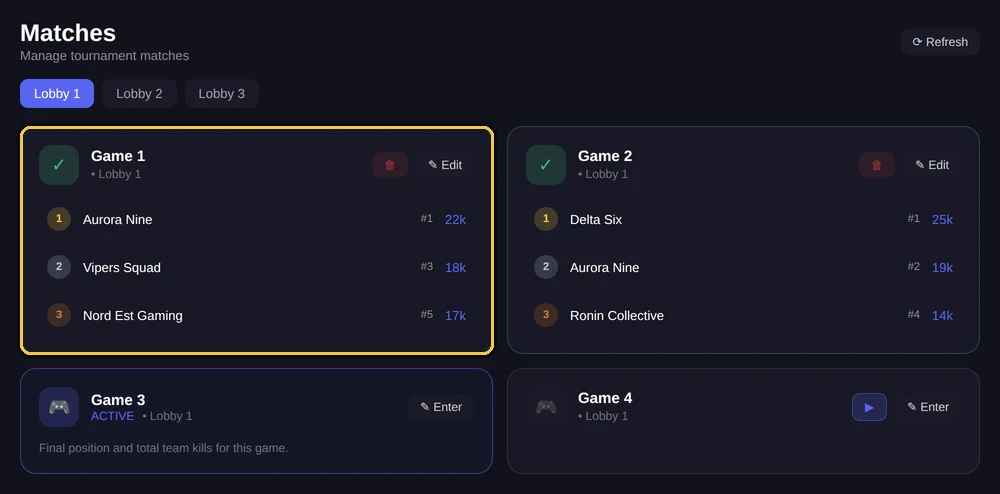
From the dashboard
The same operations are available from the dashboard, with the results grid by lobby and match.
From match to standings
Every result updates the team total and its lobby standings. You do not need to trigger any recalculation: it happens on its own.
!classificashows the overall or per-lobby standings.!classificadettagliataadds the match-by-match breakdown.- From the dashboard, Customize (new dashboard: Stream → Social images), you generate the standings as an image, ready to post.
!liveclassificagenerates the link to overlay in OBS while streaming.
Frequently asked questions
How do teams submit results on base plans?
From their own ticket, with **📸 Invia risultato** under the lobby code: placement, kills and screenshot in a single window. NEMIX does the points calculation.
What exactly does NEMIX Vision do?
You upload the end-game screenshot and NEMIX derives placement and kills from it, shows them to you and waits for your confirmation before putting them into the standings.
Can a wrong result be corrected?
Yes. The team uses **Modifica** (Edit) under the result it sent; the staff corrects with `!modificapartita` or from the dashboard. The correction stays in the history, viewable with `!storicomodifiche`.
Do I need NEMIX Vision to use the bot?
No. It is an accelerator included in the Plus plans. Without it, teams fill two fields and everything else works the same.