Creating and running a tournament
A NEMIX tournament always goes through the same phases: configure, open registrations, start, play the matches, close. Here is each phase with what you need to get through it, from the dashboard or by command.
From the dashboard
Everything below can be done from the dashboard at dashboard.nemixbot.com, logging in with Discord. The commands listed are the alternative if you prefer to stay in Discord or want to automate.
1. Create the tournament
!setupticket is the first day command, and you type it once: it starts the free trial and builds the plant — the category, the #create-ticket channel with the registration button, and the staff commands channel. What it does not do is prepare a tournament ready to take teams: the mode is not chosen yet and registrations start closed.
The tournament is created and configured from the dashboard, and that is the step that actually makes the registration button work. There are two ways in, and they lead to the same flow.
- From the My Tournaments page, the New Tournament button at the top right.
- From the sidebar, opening the Active Tournament selector: the last entry in the list is Create New Tournament.
Heads up
If someone clicks the registration button and gets Registration temporarily unavailable, it means the server has no active tournament: this typically happens after a reset. Create one from the dashboard and the button works again.
A server can hold several tournaments at once: they stay isolated, with separate teams, lobbies and standings.
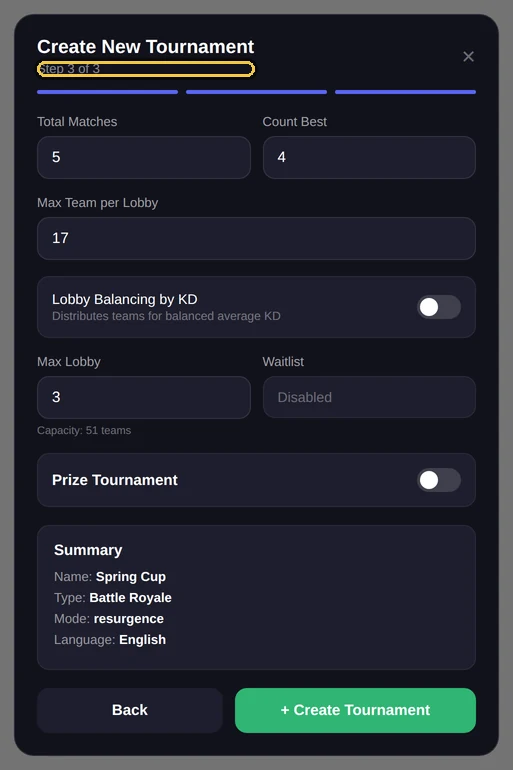
From Discord there is also !creatorneo <name>, for those who prefer not to open the dashboard or want to automate: it creates the tournament without the guided flow, and you configure it afterwards. With several tournaments active, the list is in the dashboard (Tournaments) and !selezionatorneo picks the one subsequent commands act on.
Right after !creatorneo the bot also asks how many players a team has, with four buttons from 1 to 4: the registration form will ask for exactly that number of players. From the dashboard the same choice is in the tournament settings. It is best made before opening registration; the details are in the team registration guide.
2. Choose the mode
The mode determines how points are calculated and how many teams fit in a lobby. Pick it before starting the tournament: once started it can no longer be changed.
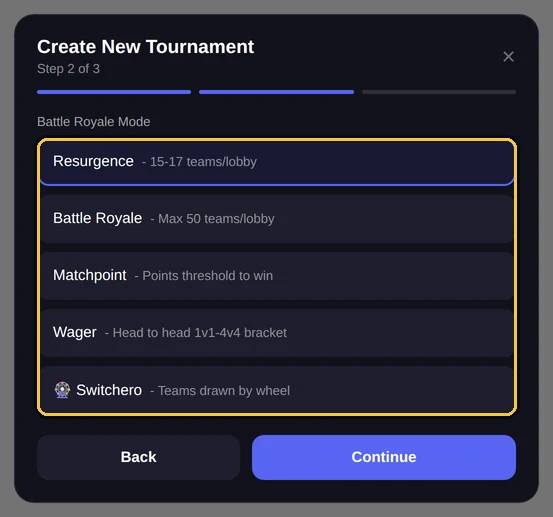
Switchero: teams formed by draw — dedicated guide coming.
| Mode | Teams per lobby |
|---|---|
| Resurgence | 15 |
| Battle Royale | 50 |
| Matchpoint | 15 |
| Wager | 15 |
These are the defaults. You can change them from the dashboard: Overview (new dashboard: Tournament → General).
How scoring differs between modes is explained in the scoring system page.
3. Set the format
The format is the pair total matches and matches that count. With 5 total and 4 counting, each team plays five matches and the four best go into the standings: the worst one is dropped.
From the dashboard
Total matches and counting matches are set from the dashboard. The !configtorneo command displays the configuration but does not change it: it is read-only.
!configtorneoAdminShows mode, format, team count, lobbies and registration status.
Aliases: !tournamentconfig · !config
4. Open and close registrations
With registrations open, the button in the #create-ticket channel is active and teams register themselves. The registration flow is detailed in its own page.
!apriiscrizioniAdminOpens registrations.
Aliases: !openregistration · !openreg
!chiudiiscrizioniAdminCloses registrations. Tickets already open remain valid.
Aliases: !closeregistration · !closereg
5. Form the lobbies
Once teams are in, they need to be distributed across lobbies. NEMIX assigns them automatically; balancing is optional and chosen per tournament — by average KD, NEMIX Smart or by Tier and Rank — and serves to avoid lopsided lobbies.
!bilancialobbyStaffDistributes teams across lobbies.
Aliases: !balancelobbies · !balance
!bilancialobby
⚠️ KD to check: I'm building the lobbies with these numbers 2 teams have every KD at 1.0: it almost always means the KD wasn't really entered. • Team Echo • Team Golf Ask the captain to fix it with Modify Team, then balance again.
⚖️ Lobby formate
Lobby 1
15 team · KD medio 1.82
Lobby 2
15 team · KD medio 1.85
Lobby 3
12 team · KD medio 1.79
If a team ends up in the wrong lobby, move it with !spostalobby without redoing the balancing.
6. Start the tournament
Starting closes registrations and activates the lobby channels and team communications. From this point the mode can no longer be changed.
!iniziatorneoAdminCloses registrations and starts the tournament.
Aliases: !starttournament · !start
7. Send out match codes
Each lobby needs the custom match code. Instead of pasting it into every ticket by hand, you send it to the whole lobby at once.
!codicelobby<lobby> <codice> [partita]StaffSends the match code to every team in a lobby.
Aliases: !lobbycode
!annuncio<lobby> <messaggio>StaffSends a free-form message to every team in a lobby.
Aliases: !announce
8. While the tournament runs
While matches are being played you record results and the standings update on their own.
!cancellagamelobbycancels a match for the whole lobby, useful after a server issue.!bonusapplies point corrections (negative for a penalty) with the reason recorded in the history.!syncrealigns tickets, categories and embeds if something has drifted.
9. Close the tournament
At the end, !terminatorneo closes the tournament while keeping data and standings available. If instead you want to start over on the same tournament, !reset clears everything, and with the keepteams option it keeps the already registered teams.
Frequently asked questions
Can I change the mode after the tournament started?
No. NEMIX blocks mode changes after the start, because it would change how already recorded scores were calculated.
Can I run several tournaments on the same server?
Yes. Each tournament has separate teams, lobbies and standings. The list is in the dashboard (Tournaments), `!selezionatorneo` picks the active one.
Is balancing mandatory?
No, it is optional. You can distribute teams randomly, or balance them by average KD, with NEMIX Smart or by Tier and Rank: the mode is chosen per tournament from the dashboard.
What happens if I cancel a match?
The match is removed from every team in that lobby and the standings are recalculated.