Team registration
Registration does not go through you: teams sign up on their own by clicking a button. NEMIX opens a private channel for each team, collects the data and puts them into the standings. Here is the flow from the organiser side and the player side.
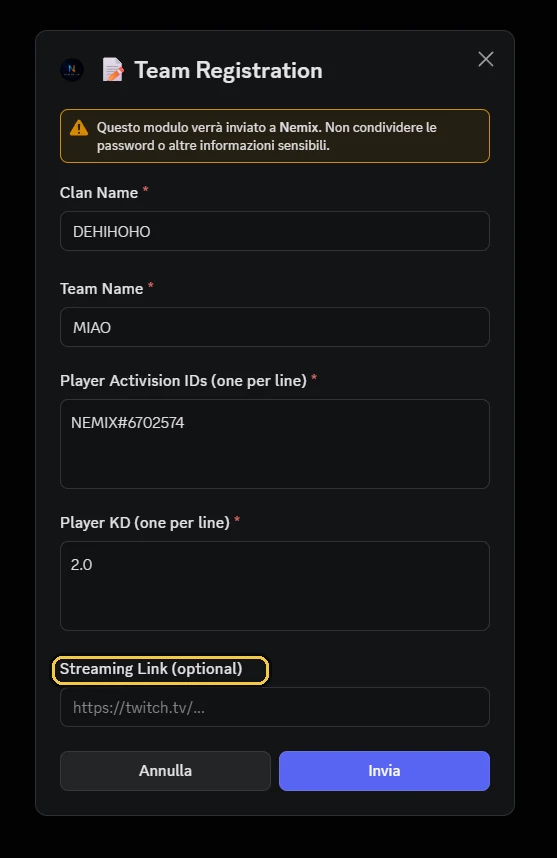
How it works, in short
- 1The captain opens the #crea-ticket channel and clicks the registration button.
- 2A form opens: clan name, team name, players, KD, streaming link.
- 3NEMIX creates a private ticket channel for that team, visible only to them and the staff.
- 4The team enters the standings and receives match codes and announcements in its ticket.
The registration form
The form has five fields. Some can be made optional depending on how you run the tournament.
| Field | What it holds | Required |
|---|---|---|
| Clan Name | The tag or clan the team belongs to | Configurable |
| Team Name | The name that will appear in the standings | Yes |
| Activision IDs | One player per line, with their Activision ID: Player1#1234567 | Yes |
| Player KD | One value per line, in the same order as the players | Configurable |
| Streaming link | The team Twitch channel or similar | Configurable |
🎮 ISCRIZIONE TORNEO
Clicca il bottone qui sotto per creare un ticket e iscrivere la tua squadra. Come funziona 1️⃣ Clicca Crea Ticket 2️⃣ Compila il form con i dati della squadra 3️⃣ Attendi la conferma di iscrizione
Note
The Activision ID with the number after the # is not required and does not block registration: if some players are written without it, a separate message under the confirmation shows a tip and how many (also after ✏️ Modify Team). It is for your benefit: without that number, two players with the same name end up in the same statistics. Once written, the ID stays: at the next registration the form opens with the players and their IDs already filled in, and changing a name in ✏️ Modify Team does not remove it.
Players per team
You can set how many players a team has, from 1 to 4. After !creatorneo the bot shows four buttons, 1, 2, 3, 4 players; the same choice is made from the dashboard, in the tournament settings. The registration form then asks for exactly that number of players and rejects the same name twice.
- The format can always be raised; lowered only if no team already registered has more players than the new value.
- If you choose nothing it stays as before: no limit.
- Wagers and Switchero have their own rules.
Heads up
Choose it before opening registration: lowering it afterwards, with teams already in, is not always possible.
KD and what it is for
The declared KD is used to compute the team average KD, which NEMIX uses to balance lobbies. If you are not balancing lobbies you can make it optional and speed up registration.
Note
A KD of 1.0 is what the bot sets when the KD is missing or cannot be read. That is why the form does not bring back KDs that are all 1.0: if a team’s saved KDs are all 1.0, the field opens empty and has to be filled in. And when you balance the lobbies, the bot lists the teams that still have every KD at 1.0: with !bilancialobby in the commands channel, from the dashboard in a window where you choose to go ahead anyway or stop and have them fixed with ✏️ Modify Team.
From the dashboard
Since 03/10/2026 !kd no longer exists. It is now done from the dashboard: Overview (new dashboard: Tournament → Game rules).
Waiting list
When the available lobbies are full, teams that register go to the waiting list instead of being rejected. They stay queued until you free a slot or approve them manually.
!approvaattesa[nome team]AdminApproves a team from the waiting list and assigns it to the first free slot. With no argument it shows who is queued.
Aliases: !approva · !approvawaitlist
Note
How many teams fit in a lobby depends on the mode: 15 for Resurgence and Matchpoint, 50 for Battle Royale. You can raise or lower it from the dashboard: Overview (new dashboard: Tournament → General).
Fixing and managing registrations
Teams misspell names, captains close tickets by mistake, someone registers outside the flow. There is a command for each of these cases.
!cambianome "Old" "New"renames an already registered team.!rimuovisquadra "Team"removes it from the tournament.!aggiungiticketmanually registers a team from the ticket you type it in.!scansionaticketrecovers registrations present in tickets but not recorded.!checkticketscompares existing tickets against the saved data.!ricreaticketrecreates missing ticket channels.
From the dashboard
The same operations are available from the dashboard, with the team list in a table you can act on directly.
Closing registration
When you have enough teams, close registration: the button stops accepting new tickets, while those already open stay valid. If you need to reopen, !riapriiscrizioni puts it back in service.
Frequently asked questions
Do players need to know any commands?
No. To register they click a button and fill a form. Commands are only for you and your staff.
Can teams see each other tickets?
No. The ticket is a private channel visible only to the team that opened it and to the staff.
What if more teams register than there are slots?
They go to the waiting list. With `!approvaattesa` you let them in when a slot frees up.
Is KD required?
It depends on your setup. It is used for lobby balancing: if you do not balance, you can make it optional from the dashboard: Overview (new dashboard: Tournament → Game rules).