Getting started with NEMIX
Going from an empty server to a working registration system takes two steps: invite the bot and type one command. Below is exactly what happens, what gets created, and what to do if something goes wrong.
1. Invite NEMIX to your server
You need a Discord server where you have the Administrator permission. From the site home, the Add Bot button opens the Discord authorisation screen: pick the server and confirm.
Heads up
NEMIX must be able to create channels and categories. If you remove the Manage Channels permission, the next step stops with a permissions error.
2. Type !setupticket
This is the NEMIX entry command. Type it in any channel of the server. In a single move it builds the tournament structure and, if the server has no license yet, starts the free trial.
!setupticketAdminCreates the tournament structure and, on first use on an unlicensed server, activates the 14-day trial.
Aliases: !setup · !install
What you will find in the server right after:
- The NEMIX TOURNAMENT category, placed at the top of the channel list.
- The #create-ticket channel: this is where teams register themselves. Everyone can see it, nobody can post in it, the only clickable thing is the registration button.
- The #comandi-nemix channel: reserved for you and your staff, this is where commands are run without players seeing them.
!setupticket
✅ Sistema Ticket Creato
Categoria
NEMIX TOURNAMENT
Canale
#crea-ticket
Comandi
#comandi-nemix
Note
If the ticket system already exists, NEMIX will not duplicate it: it tells you so and points at !resetticket to rebuild from scratch. Careful, the reset deletes existing tickets.
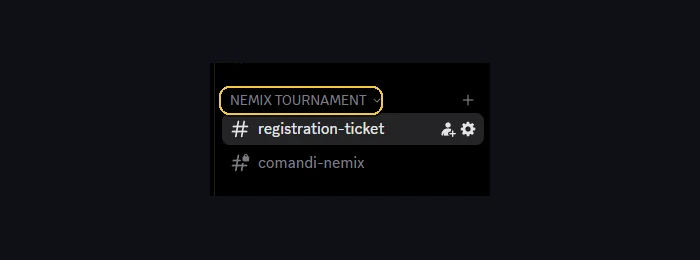
The plant is there now, but the tournament is not ready yet: registrations start closed and the mode is not chosen. !setupticket is typed once, on the first day; the next step is the dashboard, where you create the tournament, pick the mode and open registrations when you decide.
3. The free trial
The first !setupticket on an unlicensed server activates 14 days of full access. No card required, and you are never asked for payment details.
- Duration: 14 days, full access to every feature, Plus included.
- The trial counts once per server and once per account. If you already used it on another server with the same Discord account, NEMIX tells you instead of restarting it.
- If you already own a license, the trial does not start: you are already covered.
- If a tournament is still running when the trial expires, you get a window to finish it: you keep managing what you already have, but cannot open new ones.
4. After you buy
The license is tied to your Discord account, not to the server. After buying, type !attivalicenza in the server you want to enable: there is no code to paste.
!attivalicenzaEveryoneActivates an already purchased license on this server.
Aliases: !activate
Each plan covers a number of servers. If you have used them all and want to move NEMIX elsewhere, free a slot with !disattivalicenza in the server you no longer need.
| Plan | Price | Servers |
|---|---|---|
| Starter | €14.99 / month | 1 |
| Starter Plus | €19.99 / month | 1 |
| Yearly | €119.99 / year | 1 |
| Yearly Plus | €159.99 / year | 2 |
| Pro | €29.99 / month | 3 |
| Pro Plus | €34.99 / month | 3 |
Plus plans include NEMIX Vision. Monthly prices are per month, yearly ones per year.
5. What next?
The structure is in place. The next step is configuring the tournament itself: mode, match format and opening registrations.
From the dashboard
From here on almost everything happens in the dashboard: log in with Discord and you get settings, teams, lobbies and standings in one screen. Commands remain available as an alternative.
Frequently asked questions
Do I have to pay to try NEMIX?
No. The first `!setupticket` on an unlicensed server activates 14 full days and asks for no payment details.
Can I use the trial on more than one server?
The trial counts once per server and once per Discord account. It will not restart on a second server with the same account.
What happens when the trial expires?
If a tournament is running you get a window to finish it: you keep managing it but cannot create new ones. To resume fully you need a plan.
Which games does NEMIX support?
Call of Duty: Warzone, in Battle Royale, Resurgence and Matchpoint modes. Fortnite and Apex Legends are coming soon.