Multiple tournaments on one server
One server can host several tournaments at the same time, each with its own teams, lobbies and standings. This matters when you run different circuits, or when next week tournament opens registrations while this week one is still running.
What stays separate
Each tournament has its own data. Two tournaments on the same server neither see nor affect each other.
- Registered teams and their tickets.
- Lobbies, match codes and announcements.
- Results, standings and edit history.
- Mode, match format, multipliers and standings graphics.
Note
What belongs to the server rather than the single tournament stays shared: the license and the staff roles. The language, instead, belongs to each tournament: you pick it when you create it.
Creating a second tournament
You create it like the first one, from the dashboard: the New Tournament button on the tournaments page, or the Create New Tournament entry at the bottom of the Active Tournament selector in the sidebar. From Discord there is also !creatorneo <name>, which does the same thing without the guided flow.
From the dashboard
Since 03/10/2026 !tornei no longer exists. The tournament list is in the dashboard: Tournaments.
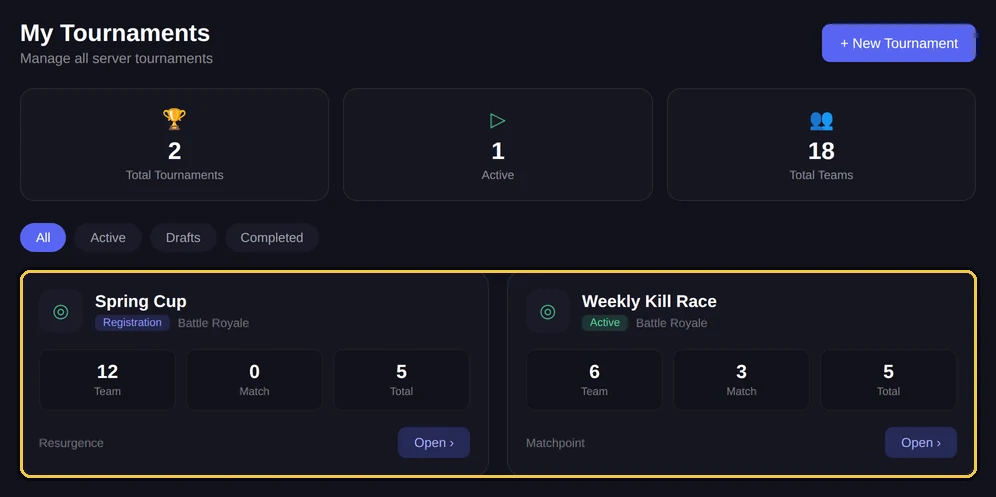
The active tournament
With several tournaments open, you need to know which one a command acts on. NEMIX determines this in two ways, in order.
- 1If you type inside a channel belonging to a tournament, for example a team ticket or a lobby channel, the command acts on that tournament.
- 2Anywhere else the active tournament applies, the one selected for the server.
!selezionatorneo<id torneo>AdminSwitches the active tournament for the server.
Aliases: !selecttournament · !switchtournament
Heads up
This is the most common multi-tournament trap: running a command from the wrong channel applies it to the wrong tournament. When in doubt, !infotorneo tells you which one you are working on before you do damage.
!infotorneoEveryoneShows status, mode and format of the tournament you are acting on.
Aliases: !tournamentinfo · !tinfo
Closing and deleting
A finished tournament can simply stay: ending it keeps standings and data available, and does not get in the way of the others. Deleting is only for when you really want the data gone.
!terminatorneoAdminEnds the tournament while keeping data and standings.
Aliases: !endtournament · !end
From the dashboard
Since 03/10/2026 !eliminatorneo no longer exists. It is now done from the dashboard: Overview or Tournaments (new dashboard: Tournament → Danger zone).
Forgotten tournaments: reminder and archive
A tournament left open and never touched again does not sit there forever. After 7 days without activity NEMIX posts a reminder in the server #nemix-commands channel, and the dashboard marks the tournament as idle, with the days of inactivity and two quick choices: "Still running" (resets the counter) or close it now.
If nobody answers, at 21 days the tournament archives itself (never sooner than 72 hours after the reminder). Archiving is soft: it is the normal closing, with data and standings intact. In the dashboard an archived tournament carries a Reopen button, and every step — reminder, archive, reopening — stays written in its log.
Note
A tournament found idle for more than 15 days and never warned before is archived directly, with the notice sent at the same time: at that distance it is clearly over. Reopening is still one click away.
Practical advice
- Give tournaments names you can tell apart at a glance: Weekly March 12 rather than Tournament 2.
- Run commands from the channels of the tournament you want to act on: safer than remembering which one is active.
- Customise standings title and logo per tournament, so published images do not get mixed up.
- End finished tournaments instead of leaving them open: the list stays readable.
Frequently asked questions
How many tournaments can I keep open at once?
There is no set limit on the number of tournaments. Your plan limit is about the servers you activate the license on, not tournaments per server.
Do teams notice there are several tournaments?
Each team sees its own ticket and the channels of the tournament it registered for. It does not see the others.
How do I know which tournament I am working on?
With `!infotorneo`. If you type it in a tournament channel, it answers for that tournament.
Can I use different modes in different tournaments?
Yes. Mode, format, multipliers and graphics are per tournament, so you can run a Resurgence and a Battle Royale in parallel.