Primeros pasos con NEMIX
De un servidor vacío a un sistema de inscripciones que funciona hay dos pasos: invitar el bot y escribir un comando. Aquí abajo tienes qué pasa exactamente, qué se crea y qué hacer si algo falla.
1. Invita a NEMIX a tu servidor
Necesitas un servidor de Discord en el que tengas el permiso de Administrador. Desde la home de la web, el botón Añadir Bot abre la pantalla de autorización de Discord: eliges el servidor y confirmas.
Atención
NEMIX tiene que poder crear canales y categorías. Si le quitas el permiso Gestionar Canales, el paso siguiente se detiene con un error de permisos.
2. Escribe !setupticket
Es el comando de entrada de NEMIX. Escríbelo en cualquier canal del servidor. De una sola vez monta la estructura del torneo y, si el servidor aún no tiene licencia, arranca la prueba gratis.
!setupticketAdminCrea la estructura del torneo y, la primera vez en un servidor sin licencia, activa la prueba de 14 días.
Alias: !setup · !install
Lo que te encuentras en el servidor justo después:
- La categoría NEMIX TOURNAMENT, colocada arriba del todo en la lista de canales.
- El canal #create-ticket: aquí los equipos se inscriben solos. Lo ve todo el mundo, nadie puede escribir en él y lo único que se puede pulsar es el botón de inscripción.
- El canal #comandi-nemix: reservado para ti y para el staff, es donde se lanzan los comandos sin que los jugadores los vean.
!setupticket
✅ Sistema Ticket Creato
Categoria
NEMIX TOURNAMENT
Canale
#crea-ticket
Comandi
#comandi-nemix
Nota
Si el sistema de tickets ya existe, NEMIX no lo duplica: te avisa y te señala !resetticket para rehacerlo desde cero. Ojo, el reset borra los tickets existentes.
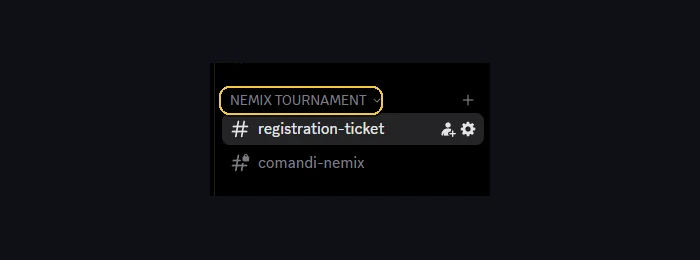
La instalación ya está, pero el torneo aún no está listo: las inscripciones nacen cerradas y el modo no está elegido. !setupticket se escribe una sola vez, el primer día; el paso siguiente es el dashboard, donde creas el torneo, eliges el modo y abres las inscripciones cuando tú quieras.
3. La prueba gratis
El primer !setupticket en un servidor sin licencia activa 14 días de acceso completo. No hace falta tarjeta y no se te pide ningún dato de pago.
- Duración: 14 días, acceso completo a todas las funciones, Plus incluido.
- La prueba vale una vez por servidor y una vez por cuenta. Si ya la has usado en otro servidor con la misma cuenta de Discord, NEMIX te lo dice en vez de volver a activarla.
- Si ya tienes una licencia, la prueba no arranca: ya estás cubierto.
- Si al caducar tienes un torneo en curso, te queda un margen para terminarlo: sigues gestionando lo que ya tienes, pero no puedes abrir torneos nuevos.
4. Después de comprar
La licencia está ligada a tu cuenta de Discord, no al servidor. Después de comprar, escribe !attivalicenza en el servidor que quieras habilitar: no hay ningún código que pegar.
!attivalicenzaTodosActiva en este servidor una licencia que ya has comprado.
Alias: !activate
Cada plan cubre un número de servidores. Si los tienes todos ocupados y quieres llevar NEMIX a otro sitio, libera una plaza con !disattivalicenza en el servidor que ya no te haga falta.
| Plan | Precio | Servidores |
|---|---|---|
| Starter | €14.99 / mes | 1 |
| Starter Plus | €19.99 / mes | 1 |
| Anual | €119.99 / año | 1 |
| Anual Plus | €159.99 / año | 2 |
| Pro | €29.99 / mes | 3 |
| Pro Plus | €34.99 / mes | 3 |
Los planes Plus incluyen NEMIX Vision. Los precios mensuales son por mes y los anuales por año.
5. ¿Y ahora qué?
La estructura ya está. El paso siguiente es configurar el torneo en sí: modo, formato de las partidas y apertura de las inscripciones.
Desde el dashboard
De aquí en adelante casi todo se hace desde el dashboard: entras con Discord y tienes ajustes, equipos, lobbies y clasificaciones en una sola pantalla. Los comandos siguen ahí como alternativa.
Preguntas frecuentes
¿Tengo que pagar para probar NEMIX?
No. El primer `!setupticket` en un servidor sin licencia activa 14 días completos y no pide ningún dato de pago.
¿Puedo usar la prueba en varios servidores?
La prueba vale una vez por servidor y una vez por cuenta de Discord. En un segundo servidor con la misma cuenta no vuelve a arrancar.
¿Qué pasa cuando caduca la prueba?
Si tienes un torneo en curso te queda un margen para terminarlo: lo sigues gestionando pero no puedes crear otros. Para seguir del todo hace falta un plan.
¿Qué juegos soporta NEMIX?
Call of Duty: Warzone, en los modos Battle Royale, Resurgence y Matchpoint. Fortnite y Apex Legends están por llegar.
Pruébalo en tu servidor
Invita a NEMIX y escribe !setupticket: 14 días completos, sin tarjeta.