Crear y gestionar un torneo
Un torneo NEMIX pasa siempre por las mismas fases: se configura, se abren inscripciones, se arranca, se juegan las partidas y se cierra. Aquí tienes cada fase con lo que necesitas para superarla, desde el dashboard o por comando.
Desde el dashboard
Todo lo que viene se puede hacer desde el dashboard en dashboard.nemixbot.com, entrando con Discord. Los comandos que aparecen son la alternativa si prefieres quedarte en Discord o quieres automatizar.
1. Crear el torneo
!setupticket es el comando del primer día, y se escribe una sola vez: arranca la prueba gratis y monta la instalación — la categoría, el canal #create-ticket con el botón de inscripción y el canal de comandos para el staff. Lo que no hace es preparar un torneo listo para recibir equipos: el modo aún no está elegido y las inscripciones nacen cerradas.
El torneo se crea y se configura desde el dashboard, y ese es el paso que hace que el botón de inscripción funcione de verdad. Hay dos caminos y llevan al mismo proceso.
- Desde la página de tus torneos (I Miei Tornei / My Tournaments), el botón Nuovo Torneo / New Tournament arriba a la derecha.
- Desde la barra lateral, abriendo el selector Torneo Attivo / Active Tournament: la última entrada de la lista es Crea Nuovo Torneo / Create New Tournament.
Atención
Si alguien pulsa el botón de inscripción y recibe Registrazione momentaneamente non disponibile, significa que el servidor no tiene un torneo activo: pasa sobre todo después de un reset. Crea uno desde el dashboard y el botón vuelve a funcionar.
En un servidor puedes tener varios torneos a la vez: quedan aislados, con equipos, lobbies y clasificaciones por separado.
Desde Discord existe también !creatorneo <nombre>, para quien prefiere no abrir el dashboard o quiere automatizar: crea el torneo sin el proceso guiado, y lo configuras después. Con varios torneos activos, la lista está en el dashboard (Torneos) y !selezionatorneo elige sobre cuál actúan los comandos siguientes.
Justo después de !creatorneo el bot pregunta también cuántos jugadores tiene un equipo, con cuatro botones del 1 al 4: el formulario de inscripción pedirá exactamente ese número de jugadores. Desde el dashboard la misma elección está en los ajustes del torneo. Conviene hacerla antes de abrir las inscripciones; los detalles están en la guía de inscripciones de los equipos.
2. Elegir el modo
El modo determina cómo se calculan los puntos y cuántos equipos caben en una lobby. Hay que elegirlo antes de arrancar el torneo: una vez arrancado ya no se puede cambiar.
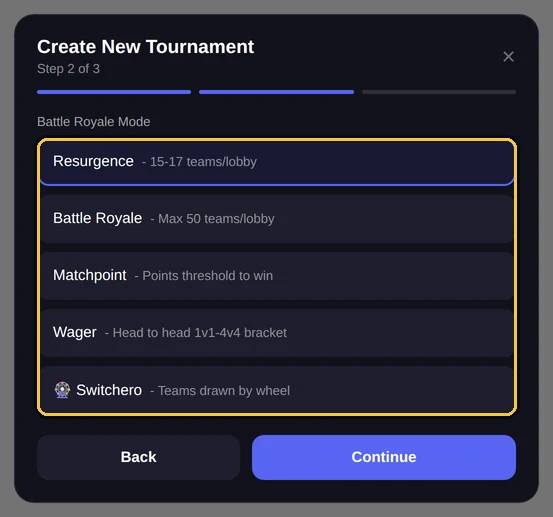
Switchero: equipos formados por sorteo — guía dedicada en camino.
| Modo | Equipos por lobby |
|---|---|
| Resurgence | 15 |
| Battle Royale | 50 |
| Matchpoint | 15 |
| Wager | 15 |
Son los valores por defecto. Puedes cambiarlos desde el dashboard: Resumen (dashboard nuevo: Torneo → Generales).
Las diferencias de cálculo entre modos están explicadas en la página del sistema de puntuación.
3. Definir el formato
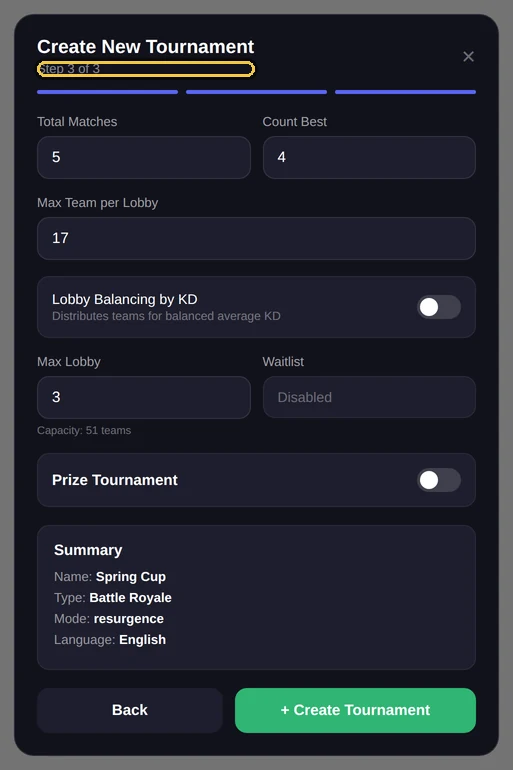
El formato es la pareja partidas totales y partidas que cuentan. Con 5 totales y 4 que cuentan, cada equipo juega cinco partidas y a la clasificación van las cuatro mejores: la peor se descarta.
Desde el dashboard
Las partidas totales y las que cuentan se definen desde el dashboard. El comando !configtorneo muestra la configuración pero no la cambia: es de solo lectura.
!configtorneoAdminMuestra modo, formato, número de equipos, lobbies y estado de las inscripciones.
Alias: !tournamentconfig · !config
4. Abrir y cerrar las inscripciones
Con las inscripciones abiertas, el botón del canal #create-ticket está activo y los equipos se registran solos. El detalle del flujo de inscripción está en su propia página.
!apriiscrizioniAdminAbre las inscripciones.
Alias: !openregistration · !openreg
!chiudiiscrizioniAdminCierra las inscripciones. Los tickets ya abiertos siguen valiendo.
Alias: !closeregistration · !closereg
5. Formar las lobbies
Cuando los equipos ya están dentro, hay que repartirlos por lobbies. NEMIX los asigna automáticamente; el equilibrado es opcional y se elige por torneo — por KD medio, NEMIX Smart o por Tier y Rank — y sirve para evitar lobbies descompensadas.
!bilancialobbyStaffReparte los equipos por las lobbies.
Alias: !balancelobbies · !balance
!bilancialobby
⚠️ KD por verificar: estoy haciendo las lobbies con estos números 2 equipos tienen todos los KD a 1.0: casi siempre significa que el KD no se escribió de verdad. • Team Echo • Team Golf Pide al capitán que lo corrija con Modificar Equipo y equilibra de nuevo.
⚖️ Lobby formate
Lobby 1
15 team · KD medio 1.82
Lobby 2
15 team · KD medio 1.85
Lobby 3
12 team · KD medio 1.79
Si un equipo acaba en la lobby equivocada, lo mueves con !spostalobby sin rehacer el equilibrado.
6. Arrancar el torneo
Arrancar cierra las inscripciones y activa los canales de lobby y los avisos a los equipos. A partir de aquí el modo ya no se puede cambiar.
!iniziatorneoAdminCierra las inscripciones y arranca el torneo.
Alias: !starttournament · !start
7. Repartir los códigos de partida
Cada lobby necesita el código de la partida personalizada. En vez de pegarlo a mano en cada ticket, lo mandas a toda la lobby de una vez.
!codicelobby<lobby> <codice> [partita]StaffEnvía el código de partida a todos los equipos de una lobby.
Alias: !lobbycode
!annuncio<lobby> <messaggio>StaffManda un mensaje libre a todos los equipos de una lobby.
Alias: !announce
8. Durante el torneo
Con las partidas en marcha se registran los resultados y la clasificación se actualiza sola.
!cancellagamelobbyanula una partida para toda la lobby, útil tras un problema de servidor.!bonusaplica correcciones en puntos con el motivo registrado en el historial.!syncrealinea tickets, categorías y embeds si algo se ha descuadrado.
9. Cerrar el torneo
Al final, !terminatorneo cierra el torneo manteniendo los datos y las clasificaciones consultables. Si en cambio quieres empezar de cero en el mismo torneo, !reset lo pone todo a cero y con la opción keepteams conserva los equipos ya inscritos.
Preguntas frecuentes
¿Puedo cambiar de modo con el torneo ya empezado?
No. NEMIX bloquea el cambio de modo tras el arranque, porque cambiaría la forma en que ya se han calculado las puntuaciones.
¿Puedo tener varios torneos en el mismo servidor?
Sí. Cada torneo tiene sus equipos, lobbies y clasificaciones por separado. La lista está en el dashboard (Torneos) y `!selezionatorneo` elige el activo.
¿El equilibrado es obligatorio?
No, es opcional. Puedes repartir los equipos al azar, o equilibrarlos por KD medio, con NEMIX Smart o por Tier y Rank: el modo se elige por torneo desde el panel.
¿Qué pasa si anulo una partida?
La partida se elimina del recuento de todos los equipos de esa lobby y la clasificación se recalcula.
Pruébalo en tu servidor
Invita a NEMIX y escribe !setupticket: 14 días completos, sin tarjeta.