Inscripciones de los equipos
Las inscripciones no pasan por ti: los equipos se registran solos pulsando un botón. NEMIX abre un canal privado para cada equipo, recoge los datos y los mete en la clasificación. Aquí tienes el flujo desde el lado de quien organiza y desde el de quien participa.
Cómo funciona, en corto
- 1El capitán abre el canal #crea-ticket y pulsa el botón de inscripción.
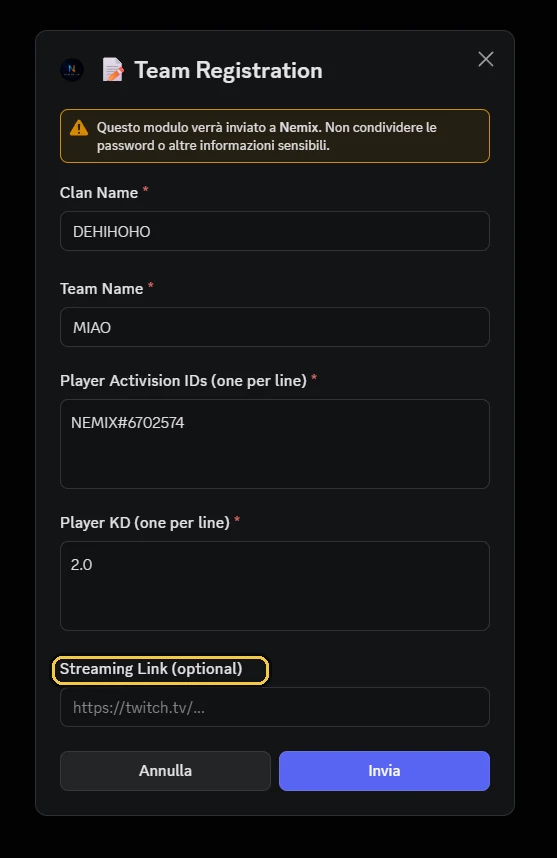
- 2Se abre un formulario: nombre del clan, nombre del equipo, jugadores, KD y enlace de streaming.
- 3NEMIX crea un canal ticket privado para ese equipo, visible solo para él y para el staff.
- 4El equipo entra en la clasificación y recibe en su ticket los códigos de partida y los avisos.
El formulario de inscripción
El formulario tiene cinco campos. Algunos los puedes dejar opcionales según cómo organices el torneo.
| Campo | Qué contiene | Obligatorio |
|---|---|---|
| Nombre del Clan | El tag o clan al que pertenece el equipo | Configurable |
| Nombre del Equipo | El nombre que aparecerá en la clasificación | Sí |
| Activision ID | Un jugador por línea, con su Activision ID: Jugador1#1234567 | Sí |
| KD de los jugadores | Un valor por línea, en el mismo orden que los jugadores | Configurable |
| Enlace de streaming | El canal de Twitch del equipo o similar | Configurable |
🎮 ISCRIZIONE TORNEO
Clicca il bottone qui sotto per creare un ticket e iscrivere la tua squadra. Come funziona 1️⃣ Clicca Crea Ticket 2️⃣ Compila il form con i dati della squadra 3️⃣ Attendi la conferma di iscrizione
Nota
El Activision ID con el número después del # no es obligatorio y no bloquea la inscripción: si algún jugador está escrito sin él, debajo de la confirmación aparece un mensaje aparte con un consejo y cuántos son (también después de ✏️ Modify Team). Te sirve a ti: sin ese número, dos jugadores con el mismo nombre acaban en las mismas estadísticas. Una vez escrito, el ID se queda: en la siguiente inscripción el formulario se abre con los jugadores y sus ID ya rellenados, y cambiar un nombre en ✏️ Modify Team no lo borra.
Jugadores por equipo
Puedes fijar cuántos jugadores tiene un equipo, de 1 a 4. Después de !creatorneo el bot muestra cuatro botones, 1, 2, 3, 4 jugadores; la misma elección se hace desde el dashboard, en los ajustes del torneo. El formulario de inscripción pide entonces exactamente ese número de jugadores y rechaza dos veces el mismo nombre.
- El formato siempre se puede subir; bajarlo solo si ningún equipo ya inscrito tiene más jugadores que el nuevo valor.
- Si no eliges nada queda como antes: sin límite.
- Los wager y el Switchero tienen sus propias reglas.
Atención
Elígelo antes de abrir las inscripciones: bajarlo después, con los equipos dentro, no siempre se puede.
El KD y para qué sirve
El KD declarado sirve para calcular el KD medio del equipo, que NEMIX usa para equilibrar las lobbies. Si no haces lobbies equilibradas puedes dejarlo opcional y agilizar la inscripción.
Nota
Un KD de 1.0 es lo que pone el bot cuando el KD falta o no se lee. Por eso el formulario no vuelve a proponer KD todos a 1.0: si los KD guardados del equipo son todos 1.0, el campo se abre vacío y hay que escribirlo. Y cuando equilibras las lobbies, el bot te enumera los equipos que aún tienen todos los KD a 1.0: con !bilancialobby en el canal de comandos, desde el dashboard en una ventana donde eliges seguir igualmente o pararte a que los corrijan con ✏️ Modify Team.
Desde el dashboard
Desde el 03/10/2026 !kd ya no existe. Ahora se hace desde el dashboard: Resumen (dashboard nuevo: Torneo → Reglas de juego).
Lista de espera
Cuando las lobbies disponibles están llenas, los equipos que se inscriben van a la lista de espera en vez de ser rechazados. Se quedan en cola hasta que liberes una plaza o los apruebes a mano.
!approvaattesa[nome team]AdminAprueba un equipo de la lista de espera y lo coloca en la primera plaza libre. Sin argumento muestra quién está en cola.
Alias: !approva · !approvawaitlist
Nota
Cuántos equipos caben en una lobby depende del modo: 15 en Resurgence y Matchpoint, 50 en Battle Royale. Puedes subirlo o bajarlo desde el dashboard: Resumen (dashboard nuevo: Torneo → Generales).
Corregir y gestionar las inscripciones
Pasa que un equipo se equivoca con el nombre, que un capitán cierra el ticket sin querer o que alguien se inscribe fuera del flujo. Hay un comando para cada uno de esos casos.
!cambianome "Viejo" "Nuevo"renombra a un equipo ya inscrito.!rimuovisquadra "Equipo"lo saca del torneo.!aggiungiticketregistra a mano un equipo desde el ticket en el que lo escribes.!scansionaticketrecupera inscripciones que están en los tickets pero no se registraron.!checkticketscompara los tickets existentes con los datos guardados.!ricreaticketvuelve a crear los canales ticket que faltan.
Desde el dashboard
Las mismas operaciones están disponibles desde el dashboard, con la lista de equipos en una tabla sobre la que actuar directamente.
Cerrar las inscripciones
Cuando tienes suficientes equipos cierras las inscripciones: el botón deja de aceptar tickets nuevos, mientras que los ya abiertos siguen valiendo. Si necesitas reabrirlas, !riapriiscrizioni las vuelve a poner en marcha.
Preguntas frecuentes
¿Los jugadores tienen que saberse los comandos?
No. Para inscribirse pulsan un botón y rellenan un formulario. Los comandos son solo para ti y para el staff.
¿Cada equipo ve los tickets de los demás?
No. El ticket es un canal privado que solo ven el equipo que lo abrió y el staff.
¿Qué pasa si se inscriben más equipos que plazas hay?
Van a la lista de espera. Con `!approvaattesa` los haces entrar cuando se libera una plaza.
¿El KD es obligatorio?
Depende de cómo configures el torneo. Sirve para equilibrar las lobbies: si no equilibras, puedes dejarlo opcional desde el dashboard: Resumen (dashboard nuevo: Torneo → Reglas de juego).
Pruébalo en tu servidor
Invita a NEMIX y escribe !setupticket: 14 días completos, sin tarjeta.