Varios torneos en el mismo servidor
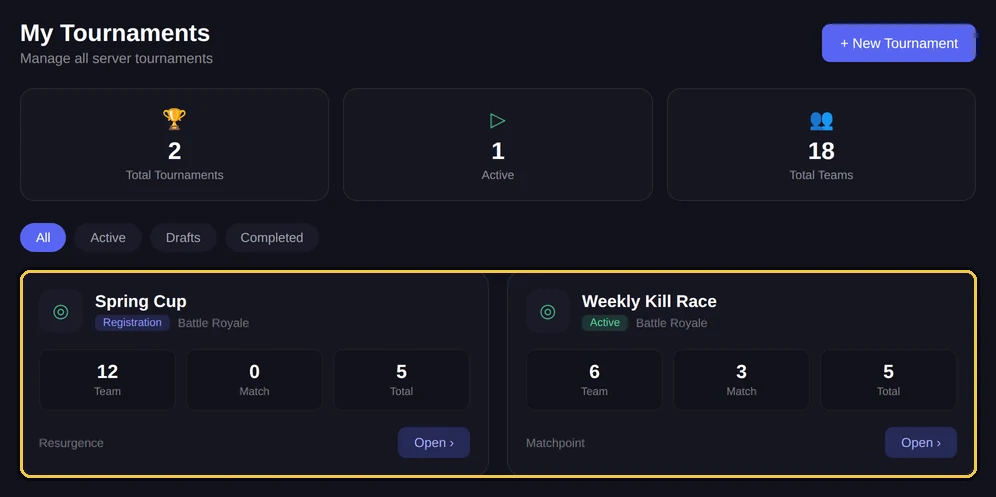
Un servidor puede alojar varios torneos a la vez, cada uno con sus equipos, sus lobbies y su clasificación. Sirve cuando llevas circuitos distintos, o cuando el torneo de la semana que viene abre inscripciones mientras el de esta semana sigue en curso.
Qué queda separado
Cada torneo tiene sus propios datos. Dos torneos en el mismo servidor ni se ven ni se afectan.
- Equipos inscritos y sus tickets.
- Lobbies, códigos de partida y avisos.
- Resultados, clasificación e historial de cambios.
- Modo, formato de partidas, multiplicadores y gráficos de la clasificación.
Nota
Queda compartido lo que pertenece al servidor y no al torneo suelto: la licencia y los roles de staff. El idioma, en cambio, es de cada torneo: lo eliges al crearlo.
Crear un segundo torneo
Se crea como el primero, desde el dashboard: el botón Nuovo Torneo / New Tournament en la página de torneos, o la última entrada del selector Torneo Attivo / Active Tournament en la barra lateral. Desde Discord existe también !creatorneo <nombre>, que hace lo mismo sin proceso guiado.
Desde el dashboard
Desde el 03/10/2026 !tornei ya no existe. La lista de torneos está en el dashboard: Torneos.
El torneo activo
Con varios torneos abiertos hace falta saber sobre cuál actúa un comando. NEMIX lo determina de dos formas, por este orden.
- 1Si escribes dentro de un canal que pertenece a un torneo, por ejemplo el ticket de un equipo o un canal de lobby, el comando actúa sobre ese torneo.
- 2En cualquier otro sitio vale el torneo activo, el que está seleccionado para el servidor.
!selezionatorneo<id torneo>AdminCambia el torneo activo del servidor.
Alias: !selecttournament · !switchtournament
Atención
Es la trampa más habitual del multitorneo: lanzar un comando desde el canal equivocado lo aplica al torneo equivocado. En la duda, !infotorneo te dice sobre cuál estás trabajando antes de que la líes.
!infotorneoTodosMuestra el estado, el modo y el formato del torneo sobre el que estás actuando.
Alias: !tournamentinfo · !tinfo
Cerrar y eliminar
Un torneo terminado puede quedarse ahí: cerrarlo mantiene las clasificaciones y los datos consultables, y no estorba a los demás. Eliminarlo solo hace falta si de verdad quieres deshacerte de los datos.
!terminatorneoAdminCierra el torneo conservando datos y clasificaciones.
Alias: !endtournament · !end
Desde el dashboard
Desde el 03/10/2026 !eliminatorneo ya no existe. Ahora se hace desde el dashboard: Resumen o Torneos (dashboard nuevo: Torneo → Zona peligrosa).
Torneos olvidados: recordatorio y archivo
Un torneo dejado abierto y nunca más tocado no se queda ahí para siempre. Tras 7 días sin actividad NEMIX publica un recordatorio en el canal #comandi-nemix del servidor, y el panel marca el torneo como parado, con los días de inactividad y dos opciones rápidas: "Sigue en curso" (reinicia el contador) o ciérralo ya.
Si nadie responde, a los 21 días el torneo se archiva solo (nunca antes de 72 horas desde el recordatorio). El archivado es suave: es el cierre normal, con datos y clasificaciones intactos. En el panel un torneo archivado lleva el botón Reabrir, y cada paso — recordatorio, archivo, reapertura — queda escrito en su registro.
Nota
Un torneo encontrado parado más de 15 días y nunca avisado antes se archiva directamente, con el aviso contextual: a esa distancia es evidente que terminó. Reabrirlo sigue siendo un clic.
Consejos prácticos
- Ponles a los torneos nombres que distingas de un vistazo: Weekly 12 de marzo en vez de Torneo 2.
- Lanza los comandos desde los canales del torneo sobre el que quieres actuar: es más seguro que acordarse de cuál es el activo.
- Personaliza el título y el logo de la clasificación en cada torneo, así las imágenes publicadas no se confunden.
- Cierra los torneos terminados en vez de dejarlos abiertos: la lista se mantiene legible.
Preguntas frecuentes
¿Cuántos torneos puedo tener abiertos a la vez?
No hay un límite fijado de torneos. El límite de tu plan es sobre los servidores en los que activas la licencia, no sobre los torneos por servidor.
¿Los equipos se enteran de que hay varios torneos?
Cada equipo ve su propio ticket y los canales del torneo en el que se inscribió. No ve los demás.
¿Cómo sé sobre qué torneo estoy trabajando?
Con `!infotorneo`. Si lo escribes en un canal de un torneo, te responde por ese torneo.
¿Puedo usar modos distintos en torneos distintos?
Sí. El modo, el formato, los multiplicadores y los gráficos son por torneo, así que puedes tener un Resurgence y un Battle Royale en paralelo.
Pruébalo en tu servidor
Invita a NEMIX y escribe !setupticket: 14 días completos, sin tarjeta.