
For organizers: collecting sign-ups
Sign-ups look like the easy part, but they're where errors pile up: missing data, duplicate teams, confirmations to chase. Before you open, decide what to ask each team.
- Team name
- Players and in-game names (the real ones you'll use to identify them in results)
- Public Activision profile for verification
- Platform and any KD limit if the tournament sets one
- Rules acceptance
The three ways to collect them
-
By message or DM
The quickest method and the messiest: data scattered in chat, lost confirmations, lists to copy by hand. It only holds up with very few teams.
-
With an external form
A form (like Google Forms) tidies up collection, but it lives outside Discord: the data then has to be copied back into the server by hand, and you still manage confirmations and the waiting list separately.
-
With a ticket system inside Discord
Each team opens a ticket and registers itself through a guided form, without leaving the server. Everything stays tracked and tied to the right tournament. This is the method NEMIX uses by default.
Confirmations, waiting list and deadlines
Set a maximum number of teams and a clear deadline. Whoever arrives after the cap goes on a waiting list and steps in if someone drops. Confirm every sign-up, so each team knows it's in and your list stays clean.
The checks
Require a public Activision profile to review accounts, apply any KD limits, and make sure each player is in only one team. These are the checks that keep the tournament clean and fair.
For players: how to sign up
On the other side, signing up is simple if you come prepared. Here's what to do.
-
Find the tournament and read the rules
In the organizer's Discord server you'll find the tournament channel. Read mode, requirements and deadlines before signing up: KD limits, platform, players per team.
-
Prepare your details
Have ready the team name, every player's in-game name and your Activision profile (set to public). These are the details you'll be asked for.
-
Open the ticket or fill in the form
Follow the tournament's sign-up system: open the ticket, enter the required details and accept the rules. Double-check the in-game names: a wrong one can cause problems when results come in.
-
Confirm and wait for the codes
Once your sign-up is confirmed, all that's left is to wait for the private lobby code, which the organizer sends at start time.
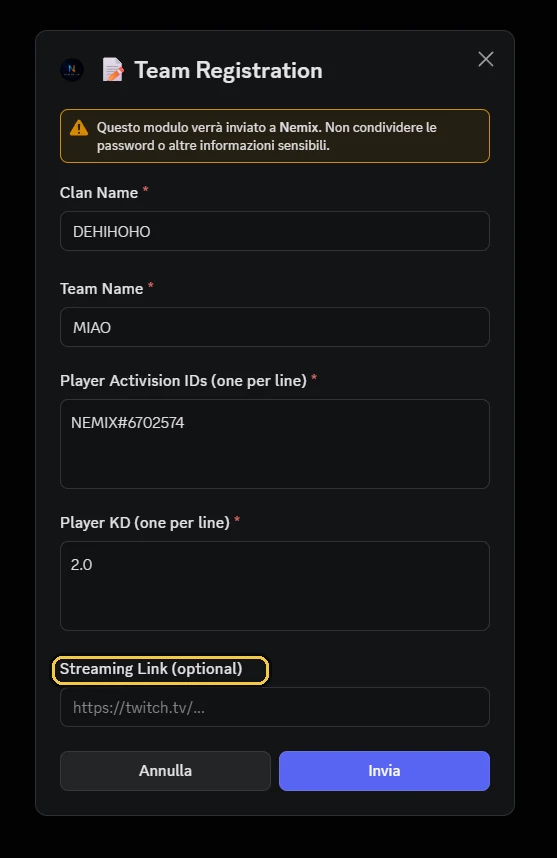
How NEMIX handles sign-ups
NEMIX removes the manual part entirely: teams register themselves, cleanly and tied to the right tournament.
- Ticket sign-ups: open and close registration with a command, the team registers itself.
- Guided form that collects the right data (team, players, in-game names), with no missing fields.
- Team list and status always up to date in the web dashboard.
- Waiting list handled automatically once the cap is reached.
- Optional entry fee: paid tournaments with payments going through Stripe straight to the organizer.
- Data tied to the right tournament, even with several tournaments running at once on the same server.
Today NEMIX supports Warzone (Fortnite and Apex are coming), all inside Discord.
Open sign-ups in a single command
With NEMIX teams register themselves, you keep the list clean and start sooner. Try it free.
Try NEMIX free 14-day free trial · pricing from a few euros per monthFrequently asked questions
How do you open sign-ups for a Warzone tournament?
You can collect them by message, with an external form, or with a ticket system inside Discord. With NEMIX you open sign-ups with a command: a ticket channel is created where each team registers itself through a guided form.
How do you sign up for a Warzone tournament on Discord?
Open the tournament's ticket or form, enter your team name, players and in-game names, accept the rules and confirm. Then wait for the private lobby code, sent at start time.
What do you need to sign up for a tournament?
Usually the team name, the players with their in-game names, a public Activision profile and, in some tournaments, a KD limit to respect.
Can you charge an entry fee?
Yes. With NEMIX you can set up paid tournaments with an entry fee: payments go through Stripe straight to the organizer.